BeanBench for iOS
A coffee logging app that keeps the details
BeanBench records what you brewed, how you brewed it, and how it tasted, then reads that history back to you. Guided recipes, espresso dial-in, and a bean library, with every field exportable. Free, and no account.
Download on the App StoreRequires iOS 17 or later.
What a coffee log actually needs to hold
Coffee has more variables than most hobbies, and they interact. Dose, water, ratio, grind, temperature, brew time, and drawdown all move the cup. So do the things about the bean you did not choose that morning: origin, process, variety, roast level, and how many days it has been off roast. A coffee that tastes thin on day three can be the best bag of the month on day twelve.
This is why a note app stops being enough. You can type "18g, 1:16, tasted great" into Notes and it will still be there next year, but you cannot ask it which grind setting your best V60s cluster around, or whether you actually prefer washed Ethiopians to naturals. Free text does not add up. A spreadsheet solves the structure and then fails at the other end, because filling one in while a kettle is going is genuinely annoying, and the entries stop after a few weeks.
A log is worth keeping only if both ends work: entering a brew has to be fast enough to do mid-pour, and the history has to give you something back. That is the whole design brief.
What BeanBench records
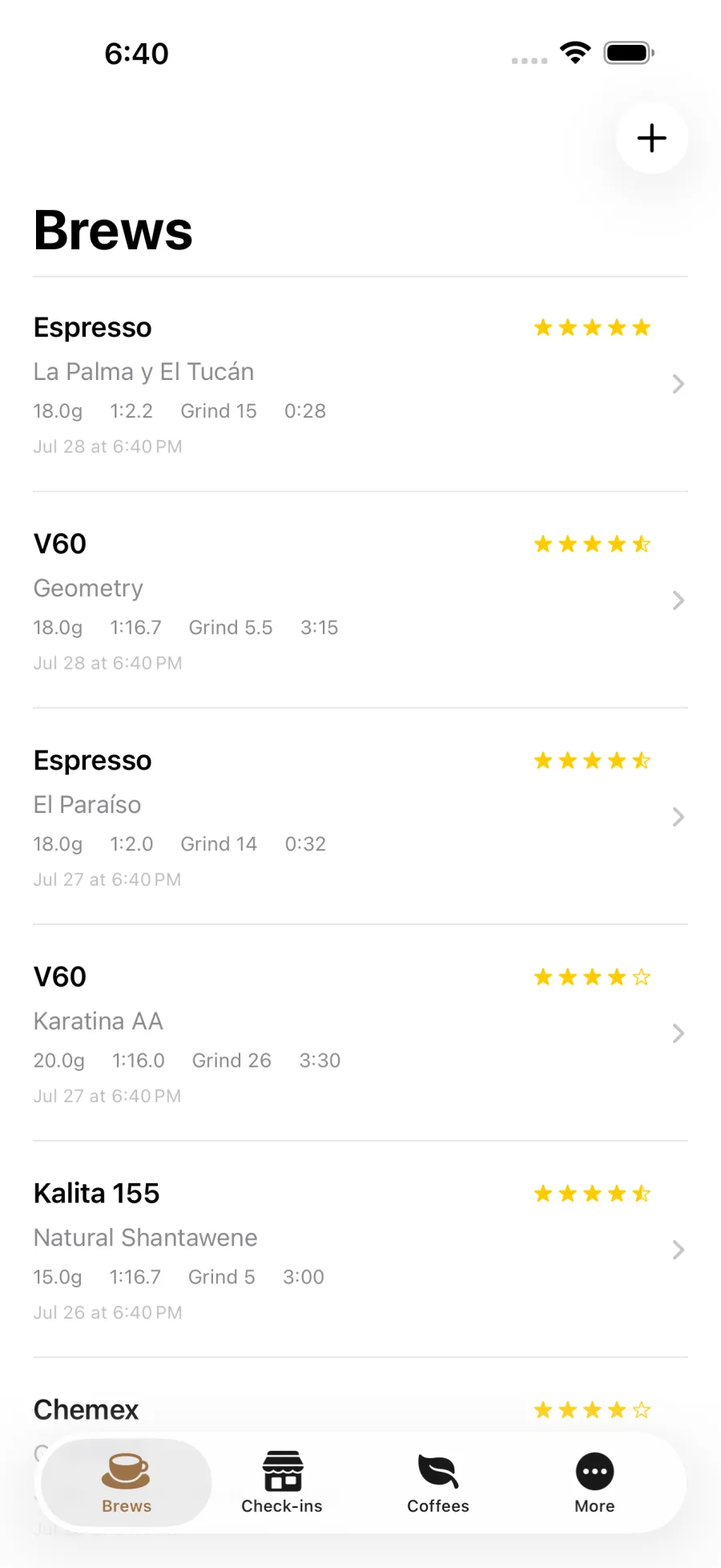
Every brew stores dose, water, ratio, grind setting with the grinder it came from, water temperature, total time, and drawdown time separately, plus a rating, free-text notes, and structured flavor tags. You can also rate acidity, sweetness, body, and bitterness on their own scales, which is what later turns into a taste profile.
Thirteen brew methods ship, from V60, Kalita, Chemex, Origami, and Stagg through AeroPress, French press, Clever, cold brew, cupping, and espresso. If you brew on something else, name it and pick the category it behaves like, and it is treated as a first-class method rather than dumped in "Other".
If you own a refractometer, enter TDS and the weight of coffee in the cup and BeanBench computes extraction yield against the SCA 18 to 22 percent window. If you did not weigh the beverage, it estimates the mass and labels the result as an estimate rather than quietly presenting a guess as a measurement.
Guided brews, timed stage by stage
Twenty-five recipes ship with the app, including eight from James Hoffmann across V60, Chemex, French press, AeroPress, iced Clever, and cold brew; Tetsu Kasuya's 4:6 and Neo Brew; Scott Rao's spin technique; Lance Hedrick's Ultimate V60; Jonathan Gagné's Osmotic Flow and blooming espresso; the World AeroPress Championship recipe; and the SCA cupping protocol. You can write and save your own, and a plain timer is there when you do not want a recipe at all.
A guided brew runs as timed stages. The screen tells you what to do now and what is coming next, with the target weight for each pour, and each stage boundary has its own haptic, so you can follow a recipe with the phone face down. Connect a scale and it shows how far you are from the next target as you pour.
Espresso dial-in
Espresso is logged as target versus actual: the dose, yield, time, and ratio you were aiming for, next to what you got. While you enter a shot, BeanBench shows the last one you pulled on that coffee, which is the comparison you actually want at the machine.
It then suggests one change for next time rather than a list. Taste takes priority over the clock, so a sour, high-acidity shot points to grinding finer even when the timing looked fine. You can save a full setup as a template, so basket, puck prep, pressure profile, and water recipe carry over instead of being retyped.
Your history stays yours
Export every field to CSV or JSON at any time. The JSON includes the full weight curves from connected scales, not just a summary. Coming from another app, BeanBench imports Beanconqueror exports directly, so switching does not cost you your history.
There are no accounts, no ads, and no analytics SDKs. BeanBench's App Store privacy label reads "Data Not Collected". Nothing you log is sent anywhere, because there is nowhere for it to be sent.
New in version 1.3
Version 1.3 is in App Review as of July 28, 2026 and should be live within days. The features below arrive with it. Everything else on this page is in the version on the App Store today.
- Sync across your devices through your own private iCloud account
- Scan a coffee bag and have the label read on your device
- Full backup and restore to a single file, photos included
Sync runs through your own private iCloud account, off by default. Bag scanning reads the label on your device, and the photos never leave your phone.
How it compares
Two other apps come up constantly in this category, and both are good. Here is where BeanBench actually differs.
| BeanBench | Beanconqueror | Filtru | |
|---|---|---|---|
| The brew log | Free | Free | Requires Filtru Pro |
| Platforms | iOS 17 or later | iOS and Android | iOS 18 or later |
| Open source | No | Yes (GPL-3.0) | No |
Logging is the free part here. Filtru is polished and well reviewed, with unusually good accessibility support, but its coffee log, espresso dial-in, and shot recording sit behind Filtru Pro, which runs $3.49 a month, $32.99 a year, or $79.99 once. In BeanBench the log is the product, and there is no paid tier to reach it.
Being iOS-only is what buys the privacy. BeanBench does not run on Android, and that is the trade that makes the rest work. There is no BeanBench account to create and no server holding your brews, and when sync arrives in 1.3 it runs through your own iCloud account rather than ours. Our App Store privacy label reads "Data Not Collected". Filtru's published label discloses data collected and linked to your identity. Both are Apple's own disclosures, on the listings, today.
You can leave whenever you want. BeanBench imports Beanconqueror files and exports every field to CSV or JSON, weight curves included. A log is a decade-long record if it is any good, so being able to walk out with it matters more than any single feature.
Where the others are stronger. Beanconqueror is free, open source, and covers more ground than BeanBench in places, including green-bean roast logging and a longer list of supported scales. It has no cloud sync, which its own reviewers ask for most, but if you want Android or open source it is the better tool and you should use it. Filtru has years of polish and a far larger user base than BeanBench, which launched in 2026.
And against a spreadsheet, which is the real incumbent: a spreadsheet is free and genuinely right for some people. It loses on entry speed mid-brew, and it gives nothing back unless you build the analysis yourself.
Competitor details checked against Apple's App Store listings, iTunes lookup API, and official documentation in July 2026. Apps change; check the current listing before deciding.
Frequently asked questions
What should I track in a coffee log?
At minimum: dose, water, grind setting, water temperature, brew time, and how it tasted. Those six let you repeat a good cup. Roast date matters as much as any of them, because the same coffee brews differently at four days off roast than at fourteen. If you weigh the coffee in the cup and own a refractometer, adding beverage mass and TDS gives you extraction yield.
How do I log espresso shots?
BeanBench records espresso as a target versus actual: the dose, yield, time, and ratio you aimed for next to what you actually got. It shows the previous shot on the same coffee while you enter the new one, then suggests a single next change based on dose, yield, time, and how the shot tasted. You can save a setup as a template so basket, prep, pressure profile, and water carry over between sessions.
Does BeanBench work with a Bluetooth scale?
Yes, with Acaia (Pearl, Lunar, Pyxis) and Decent scales. Connected, the guided timer shows live weight and how far you are from the next pour target, and the finished brew keeps the full weight curve so you can see flow rate over the pour. A scale is optional. Everything can be entered by hand.
Can I move my history over from Beanconqueror?
Yes. BeanBench imports Beanconqueror exports directly, mapping beans, brews, and grinders into its own library. You can also import BeanBench's own CSV and JSON files, which is one way to move a history between devices.
How is this different from a spreadsheet?
A spreadsheet holds the same fields, and plenty of people run one for years. The difference is at the two ends: entering a brew mid-pour with a kettle in one hand, and getting something back out later. BeanBench times the brew as you make it, then reads your own history back as patterns, like which grind and temperature your highest-rated brews cluster around. Every insight shows the number of brews behind it so you can judge how much to trust it.
What is extraction yield, and do I need a refractometer?
Extraction yield is the percentage of the dry coffee that dissolved into the cup, calculated from beverage mass and TDS. The SCA golden cup range is 18 to 22 percent. You do not need a refractometer to use BeanBench, and most people never buy one. If you have one, enter the TDS reading and BeanBench computes the yield and shows where it falls against that window. Without a measured beverage weight it estimates the mass and marks the result as an estimate.
Everything in the app
- Guided brew timer with haptic pour cues
- Detailed brew log: dose, water, grind, temp, time, drawdown
- TDS input and extraction yield, checked against the SCA 18–22% window
- Espresso dial-in with shot-over-shot comparison and next-change coaching
- Bean library with origin, process, varietal and rest tracking
- Bluetooth scale support (Acaia, Decent) with live flow rate and saved pour curves
- Analytics: brew trends, taste profile, and insights from your own logs
- CSV / JSON export of your whole history, weight curves included
- Beanconqueror import, so your old logs come with you
- Local-first: your data stays on your device, and no account is required
Free on the App Store. Requires iOS 17 or later. If you want the longer version of why this exists, read why I built BeanBench.